How to Play Aviafly 2: Complete Rules & Tutorial
Everything you need to know about Aviafly 2's flight path mechanics, paytable, and interface. This guide covers the rules in detail so you can start playing confidently.
Quick Overview: What Makes Aviafly 2 Different
If you've played crash games like Aviator or JetX, Aviafly 2 will feel familiar but operates differently. The key distinction: you don't control when to cash out. Instead, the game follows a pre-calculated flight path, and your job is to bet on whether the plane will land safely.
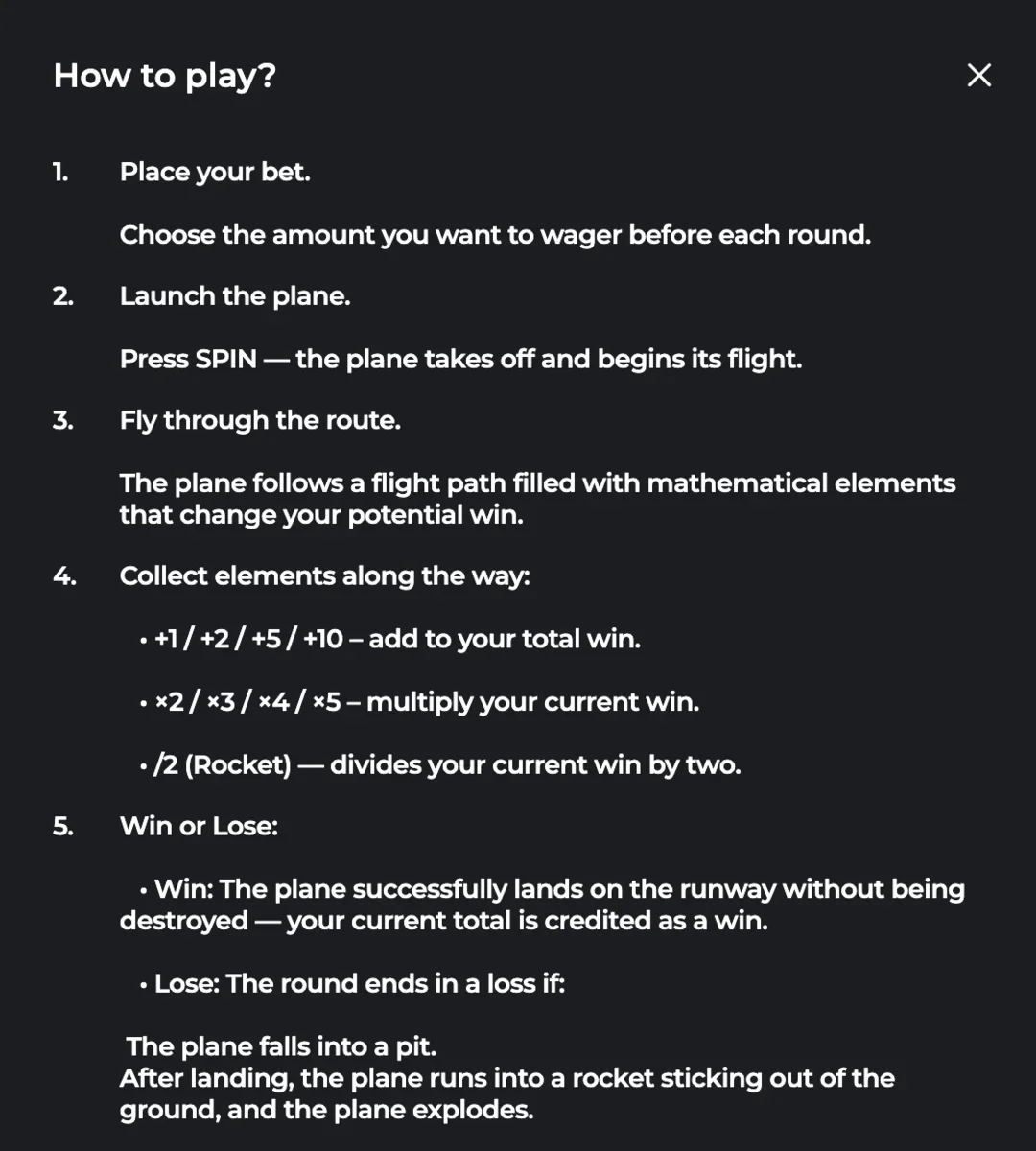
Here's the core concept: place a bet, launch the plane, and watch it navigate through a field of mathematical elements. Some elements add to your win (+1, +2, +5, +10), multipliers increase your total (x2, x3, x4, x5), and dividers can halve it (/2). The round ends when the plane either lands safely (you win) or crashes (you lose).
In Aviator, you decide when to cash out before the plane flies away. In Aviafly 2, the outcome is determined by the flight path — you're watching a result unfold rather than making real-time decisions. Some players find this more relaxing, others prefer the control of traditional crash games.
Step-by-Step: How to Play
Place Your Bet
Look at the betting panel at the bottom of the screen. You'll see a BET section with your current stake (displayed in dollars). Use the up/down arrows to adjust, or tap the amount to type directly.
- Minimum bet: $0.10
- Maximum bet: $200
- Your current balance is shown on the left
Adjust Speed (Optional)
Before launching, you can change the game speed. Look for the SPEED setting next to the bet controls. Options typically include "Normal" and faster modes.
Faster speeds mean quicker rounds — useful if you want to play more games in less time. Normal speed lets you watch the action unfold at a comfortable pace.
Launch the Plane
Press the green SPIN button (the play icon) to start. Your biplane takes off from the runway and begins flying through the game field.
Pro tip: Hold the SPIN button to activate Auto Game mode. This lets you set multiple rounds to play automatically without pressing the button each time.
Watch the Flight & Collect Elements
As the plane flies, it collects mathematical elements along its path. These appear as floating numbers and symbols in the sky:
- +1, +2, +5, +10 — Add directly to your win total
- x2, x3, x4, x5 — Multiply your current win
- /2 (Rocket) — Divides your current win by two
Your accumulated total is displayed above the plane in yellow/green text.
Win or Lose
The round ends in one of two ways:
- WIN: The plane successfully lands on the runway. Your accumulated total (shown above the plane) becomes your win. A green "You win" banner appears.
- LOSE: The plane crashes into a pit on the runway, OR after landing, it runs into a rocket sticking out of the ground and explodes. You lose your bet.
Paytable: Mathematical Elements Explained
Unlike slot machines with fixed symbol payouts, Aviafly 2's "paytable" consists of the mathematical elements that modify your win during flight. Here's what each element does:
| Element | Visual | Effect | Example |
|---|---|---|---|
| +1 | Green number | Adds $1 to your current win | $5 current → +1 → $6 |
| +2 | Green number | Adds $2 to your current win | $10 current → +2 → $12 |
| +5 | White/blue number | Adds $5 to your current win | $8 current → +5 → $13 |
| +10 | White/blue number | Adds $10 to your current win | $4 current → +10 → $14 |
| x2 | Gold glowing | Multiplies your current win by 2 | $5 current → x2 → $10 |
| x3 | Gold glowing | Multiplies your current win by 3 | $10 current → x3 → $30 |
| x4 | Gold glowing | Multiplies your current win by 4 | $8 current → x4 → $32 |
| x5 | Gold glowing | Multiplies your current win by 5 | $6 current → x5 → $30 |
| /2 | Red rocket | Divides your current win by 2 | $20 current → /2 → $10 |
Elements are collected in order along the flight path. A x5 multiplier early when you have $2 accumulated gives you $10. The same x5 multiplier later when you have $50 accumulated gives you $250. The sequence matters.
Interface Breakdown
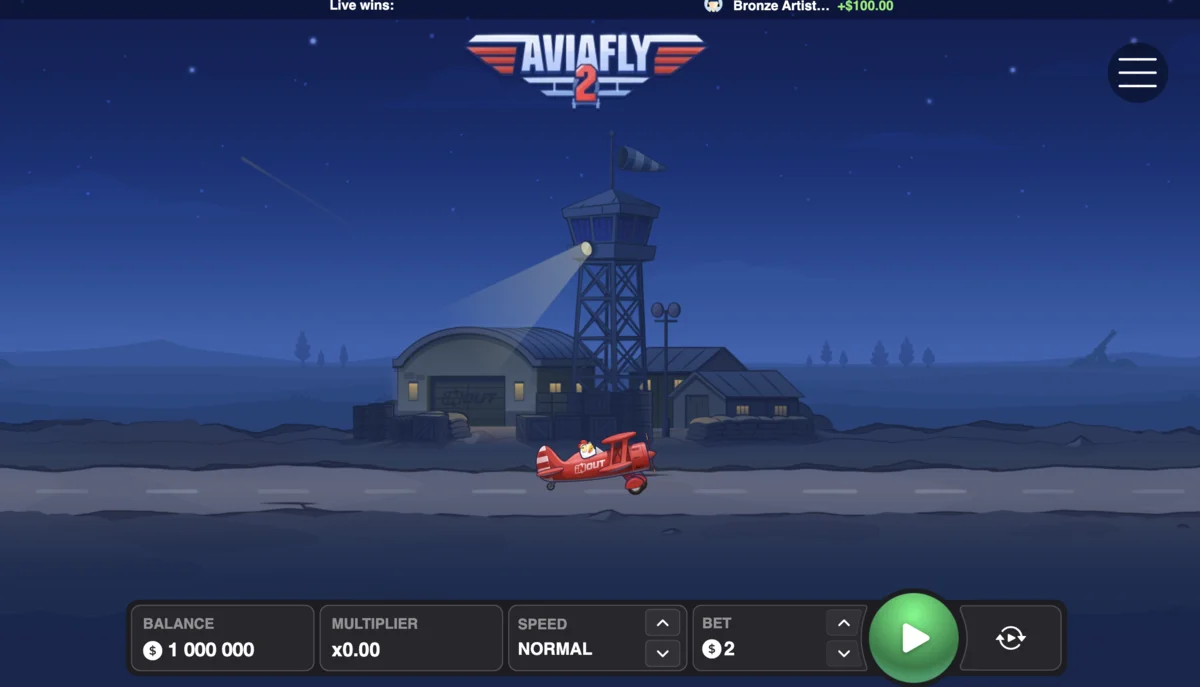
Key Interface Elements
Top Bar
Live Wins: Shows recent wins from other players in real-time. Displays username and amount won.
Menu (☰): Access settings, provably fair verification, game rules, and sound options.
Bottom Panel
BALANCE: Your current account balance in the selected currency.
MULTIPLIER: Current accumulated multiplier for the round (starts at x0.00).
SPEED: Game speed control (Normal/Fast).
BET: Your stake for the next round.
Game Field
Biplane: Your plane character that flies through the course.
Elements: Floating numbers (+1, +5, x2, etc.) scattered across the sky.
Background: Runway, airport with control tower, hangars, and atmospheric elements.
Win Display
Above plane: Current accumulated win shown in yellow/green above the aircraft.
Collection trail: Shows recent elements collected (+1, x3, etc.) stacking above the plane.
LAST WIN: Bottom of screen shows your previous round result.
Auto Game Mode
Auto Game lets you play multiple rounds automatically without pressing SPIN each time. Here's how it works:
- Activate: Hold the SPIN button instead of pressing it quickly. A popup will appear.
- Choose rounds: Select how many automatic rounds you want to play.
- Watch: The game runs rounds automatically. Wins are credited immediately, and the next round starts after each result.
- Stop anytime: You can cancel auto-play by pressing the button again.
Auto Game is useful for longer sessions where you don't want to manually start each round. It's also helpful for implementing consistent betting strategies. Just make sure to set a budget limit before starting — it's easy to burn through your bankroll faster than expected.
Provably Fair: How to Verify Results
Aviafly 2 uses SHA256 cryptographic hashing to ensure every round is provably fair. This means you can mathematically verify that the game didn't manipulate results.
How It Works
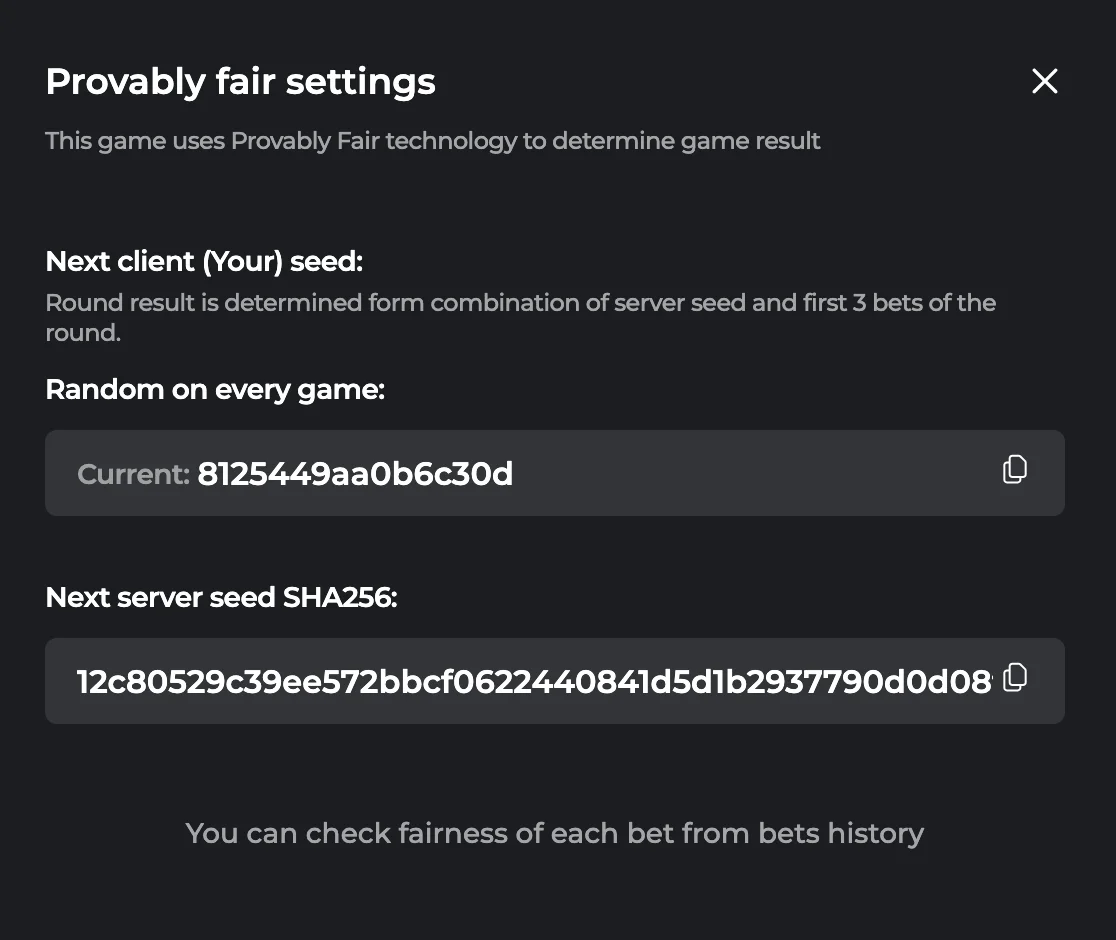
- Server Seed: The game generates a server seed (shown as SHA256 hash) before each round. This determines the outcome but is encrypted so you can't see the result in advance.
- Client Seed: Your seed (randomly generated or customizable) combines with the server seed.
- First 3 Bets: The round result is determined from a combination of server seed and the first 3 bets placed in that round.
- Verification: After the round, you can check the fairness from your bet history. The revealed server seed lets you verify the math.
To Verify a Round
- Open the menu (☰ icon)
- Go to "Provably Fair Settings"
- Note your current client seed and the server seed SHA256 hash
- After playing, check your bet history
- Use the revealed seeds to verify the outcome mathematically
The system ensures that neither you nor the casino can predict or manipulate the outcome. The result is determined before your bet but only revealed after the round ends.
Betting Limits & Payouts
| Limit | Amount | Notes |
|---|---|---|
| Minimum Bet | $0.10 | Lowest possible stake per round |
| Maximum Bet | $200 | Highest possible stake per round |
| Maximum Win | $20,000 | Cap on any single round payout |
| RTP | 96.5% | Return to Player over long term |
| House Edge | 3.5% | Casino's mathematical advantage |
Win Rounding
Aviafly 2 rounds win amounts:
- If your winnings exceed your bet amount, profits are rounded up to the nearest whole number.
- If your winnings are less than your bet, they're rounded down to the nearest whole number.
Example: A $2 bet that results in a $3.47 total gets rounded to $4 (profit rounded up). A $5 bet that results in $3.62 gets rounded to $3 (loss rounded down).
Frequently Asked Questions
What does each mathematical element do in Aviafly 2?
Addition elements (+1, +2, +5, +10) add their value directly to your accumulated win. Multiplier elements (x2, x3, x4, x5) multiply your current total by that factor. The divider element (/2) cuts your current win in half. Elements are applied in sequence as the plane collects them.
How do I win in Aviafly 2?
You win when the plane successfully lands on the runway without being destroyed. Your accumulated total (built from collecting mathematical elements) becomes your payout. You lose your bet if the plane falls into a pit on the runway or hits a rocket after landing.
Can I control when to cash out in Aviafly 2?
No. Unlike Aviator where you manually time your cashout, Aviafly 2 determines the result through a pre-calculated flight path. Once you press SPIN, the outcome is set — you watch the result unfold. This is the main gameplay difference from traditional crash games.
What is Auto Game mode in Aviafly 2?
Auto Game lets you play multiple rounds automatically. Hold the SPIN button to activate it, then choose how many rounds to play. The game runs rounds back-to-back, crediting wins automatically. You can stop at any time by pressing the button again.
How does win rounding work in Aviafly 2?
If your winnings exceed your bet (a profitable round), the profit is rounded up to the nearest whole number. If your winnings are less than your bet (a loss), they're rounded down. This affects the final credited amount.
Playing on Mobile
Aviafly 2 works on any smartphone or tablet through your browser. No app download or APK needed.
Browser-Based
Play directly in Safari, Chrome, or any mobile browser. The game uses HTML5 and runs smoothly on iOS and Android without installation.
Touch Controls
The interface is optimized for touchscreens with large tap targets. Rotate to landscape mode for the best view of the flight path.
Ready to Try Aviafly 2?
Practice in demo mode first, or jump straight into real money play.